
In Lync Server, by default, Quality of Service (QoS) is not enabled for the Windows Lync soft client, yet it is enabled for Lync Phone Edition clients. Thus it is important to understand that Lync Phone Edition devices will stamp a Differentiated Services Code Point (DSCP) value of 40 on media traffic while the standard Lync client will leave this field null.
In at least one field-engagement there were reported call quality issues between Lync Phone Edition devices in different sites across a WAN, yet anyone on the Windows Lync client was unaffected. The WAN routers were prioritizing traffic stamped with a DSCP value other than 40, so the 0 value traffic from the computers was being treated normally, but the 40 value traffic from the phones was being deprioritized, thus dropping a lot of packets of that traffic type. Once the QoS tagging was updated in Lync to the proper value then call quality returned to normal for all endpoints uniformly.
The following steps show how to validate the default configuration in Lync and can be used to change the setting if desired.
Default Configuration
- Using the Lync Server Control Panel browse to the Clients > Device Configuration section and view the properties of the default Global object.
- As shown the Voice quality of service setting is enabled and configured to a value of 40. This setting can be changed to 0 is disable DSCP tagging.

- Alternatively the same steps can also be performed from the Lync Server Management Shell by issuing the following cmdlet:
PS C:\> Get-CsUCPhoneConfiguration
Identity : Global
CalendarPollInterval : 00:03:00
EnforcePhoneLock : True
PhoneLockTimeout : 00:10:00
MinPhonePinLength : 6
SIPSecurityMode : High
VoiceDiffServTag : 40
Voice8021p : 0
LoggingLevel : Off
- Run the Set-CsUCPhoneConfiguration cmdlet to specify the desired value for DSCP stamping or to disable the behavior by setting a value of 0.
Set-CsUCPhoneConfiguration -Identity global -VoiceDiffServTag 0
DiffServ Classifications
Before looking at the actual traffic it would be prudent to quickly review the different DiffServ classifications which are applicable to prioritizing media in Lync.
- Default is what unmarked traffic is classified as (using a null DSCP value) and is delivered on a best-effort bases just the same as all other non-prioritized traffic.
- Class Selector (CS) is a grouping of values that are backwards compatible with the pre-DiffServ method of prioritizing traffic called Type of Service (ToS). Multiple Precedence Levels are defined as per RFC791 and the following table shows the DSCP decimal values for each level. Note how DSCP 40 is categorized as this will be discussed shortly.
Precedence
LevelDiffServ
MarkingToS Name Description 7 DSCP 56 (CS7) Network Control Reserved for IP routing protocols 6 DSCP 48 (CS6) Internetwork Control Reserved for IP routing protocols 5 DSCP 40 (CS5) CRITIC/ECP Express Forwarding (EF) 4 DSCP 32 (CS4) Flash Override Class 4 3 DSCP 24 (CS3) Flash Class 3 2 DSCP 16 (CS2) Immediate Class 2 1 DSCP 8 (CS1) Priority Class 1 0 DSCP 0 (Default) Routine Best Effort
- Assured Forwarding (AF) is a group of 12 different levels of prioritization that assures delivery as long as this traffic does not exceed defined rates, as anything that exceeds this rate has an increased probability of being dropped. The table below shows the multiple classes available to assign different traffic across the varying levels of prioritization available with AF. The DSCP decimal values are also identified for each AF classification as defined by RFC2597.
Drop
PrecedenceClass 1 Class 2 Class 3 Class 4 Low DSCP 10 (AF11) DSCP 18 (AF21) DSCP 26 (AF31) DSCP 34 (AF41) Medium DSCP 12 (AF12) DSCP 20 (AF22) DSCP 28 (AF32) DSCP 36 (AF42) High DSCP 14 (AF13) DSCP 22 (AF23) DSCP 30 (AF33) DSCP 38 (AF43)
- Expedited Forwarding (EF) is a single-value classification that is often granted the highest priority (below classification reserved for routing protocol traffic) and should be controlled through bandwidth management and call admission control policies on the network. This class is ideal for real-time media as it provides a mechanism for reduced loss, delay, and jitter. Many networks will already be controlling EF traffic as well as limiting the total amount of bandwidth that EF traffic can consume on the network as if too much traffic is stamped with EF then assured delivery can become compromised. RFC2598 allocates a single DSCP value for all traffic in this classification as decimal 46 (hexadecimal 2E, binary 101110).
One common point of confusion in the field is that Microsoft has always defaulted to using a DSCP value of 40 in practice and their documentation with OCS and Lync, and in some places this is referred to simply as ‘EF”, yet a DSCP value of 46 is also defined as ‘EF’. The mix-up here is because value a decimal DSCP value of 40 denotes Class Selector 5 (CS5) which falls into Precedence Level 5, also known as Express Forwarding (EF). So the acronym ‘EF’ could mean either the Express Forwarding Precedence Level (DSCP 40) or the Expedited Forwarding classification (DSCP 46) depending on the context used.
Validating Default Media Traffic
A peak at traffic captured between a CX3000 (192.168.103.104) and the Lync Server during a conference call shows that the media is stamped with a DSCP hexadecimal value of 0x28, which is equal to 40 in decimal. The binary value of 101000 is also shown in the DiffServ field data. Additional information shown in the IP header should also look familiar, like “Class Selector 5”.
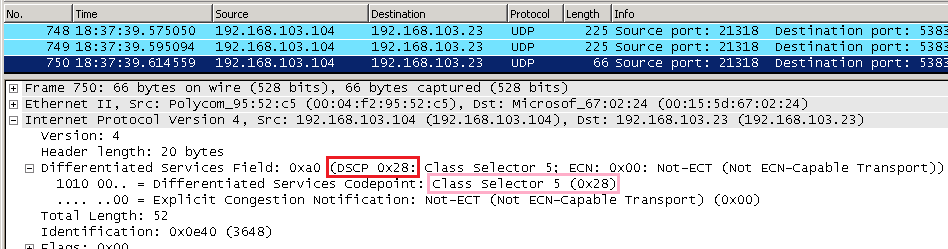
But the same media traffic captured from a Windows 7 Lync client (192.168.103.10) shows a DSCP value of 0.

In the event that all traffic should be prioritized equally, be it from the soft-client or the phones then either remove tagging on the device configuration policy, or enable tagging on the Windows clients. Clearly one approach would treat all media traffic as best-effort (0) while the other would provide a level of Quality of Service delivery, with the assumption that the network equipment is configured to prioritize DSCP 40 traffic (or whichever value is desired).
The Enabling Quality of Service with Microsoft Lync Server 2010 white paper goes into details on how to manage QoS tagging for all Lync components.
Thanks!
Thank you!
[…] Lync Quality of Service Behavior September 10, 2011 robertrieglerwien Leave a comment Go to comments http://blog.schertz.name/2011/08/lync-qos-behavior/ […]
Can i tag the SIP Messages also?
Hey Jeff I was wondering what happens when you use a DSCP value higher than 46? For instance my boss wanted to use 55, but it says 48 and 56 are reserved for IP routing protocols. Does this mean the range of 48-56 are reserved or just those 2 specific values? Also if it is a range, how does it work if its set to 55? Does it default back to 46 or 47?
Thanks!
As values that high are out-of-range I would assume that nothing happens 🙂 Even if the packets can be marked with that value then I'd guess that the routers either ignore the traffic and treat it as normal or block the traffic due to an illegal DCSP value. I've never tested it. And no, you cannot tag packets with the values reserved for router control messages.
Yeah I checked with wireshark and it is tagging the packets as 0x37 which is infact 55. We noticed an immediate increase in quality after making this change, though. Perhaps 55 is legal then? Or perhaps it does treat it as 46.
[…] To better understand DiffServ and its affect on the network, please check out the excellent blog article written by fellow Lync MVP Jeff Schertz at the following URL: http://blog.schertz.name/2011/08/lync-qos-behavior/ […]
[…] To better understand DiffServ and its affect on the network, please check out the excellent blog article written by fellow Lync MVP Jeff Schertz at the following URL: http://blog.schertz.name/2011/08/lync-qos-behavior/ […]
Jeff,
Lync packets are not tagged by default reason why you see the dscp value set to 0x00 on your windows 7 client.
You have to push a "policy based Qos" by GPO to tag the dscp field to a specific value (applied on Windows 7)
http://technet.microsoft.com/en-us/library/gg4054…
Correct, this article is related to Lync Phone Edition devices which are tagged by default. Tagging on the Windows Lync client is not enabled by default and in the last line in my article I reference the documentation which explains how to enabled Policy Based QoS tagging for those clients.
[…] information on how to confirm the DSCP markings are being applied, see the blog by Jeff Schertz on QoS. Share this:TwitterFacebookLike this:LikeBe the first to like […]
Good info.. my firewall just says "EF" so I am verfiying with the vendor if that is class 40 or 46.. I assume if it is 46 I am out of lucky since my CX600 phones are likely 40?
Justin, in this case you should change you Lync Server configuration to move the phones to the same class as your network. As 'EF is 46 then you should update the configuration to use 46 instead of the default 40.
thanks.. I found out I can specify 40 manually so I think I am good.. except for our Lync cloud hosted provider (NextUC) does not have DSCP enabled on their side so I am not sure how much good it going to do us. 🙂
[…] To better understand DiffServ and its affect on the network, please check out the excellent blog article written by fellow Lync MVP Jeff Schertz at the following URL: http://blog.schertz.name/2011/08/lync-qos-behavior/ […]
[…] To better understand DiffServ and its affect on the network, please check out the excellent blog article written by fellow Lync MVP Jeff Schertz at the following URL: http://blog.schertz.name/2011/08/lync-qos-behavior/ […]
Hi Jeff, great post. I am sniffing the port that the phone (CX600) is on, but i'm only seeing DSCP marking of 40 when the phone communicates with the UC server (exchange 2010) not the lync FE (lync 2010). Is there any thing additional needed for the Lync FE server to make this work?
Are you seeing the correct markings when placing peer-to-peer calls with another Lync client?
Is not the correct value of DSCP 46 as opposed to 40?
There is no single 'correct' DSCP value as it can be a different in any network. The 'correct' value is the one that your network is configured to prioritize. For example Cisco networks often use EF (46).
Good discussion Jeff. With the RT audio CODEC, I have observed that Lync it is very robust to packet loss and jitter. We are using MPLS from VZ and to use EF tagging, we need to pay for Committed Access Rate traffic (VZ name – GOLD CAR). I don't really feel good about wasting bandwidth when not being used, so we've moved Lync to AF41 to still provide high-priority when we near link congestion. We ran OCS 2007 over an Internet-based WAN with a far higher packet loss and jitter than our MPLS network, and it worked fine. My observation is that we as an industry are tending to treat computer telephony (Lync) with seriously robust CODECs as though it were legacy G.711. I just don't see the value in using CAR for Lync.
Thanks for your help jeff. i am struggling with one of the issue which is the lync Call Drops intermittently . I have done investigation with network team and come with question that the wireshake is not showing the DSCP Packet form edge server to external but it shows DSCP Packet “DSCP 0x2e : which mean its equal to 46) when the packet get into Edge server. I have checked the encryption is not enable on edge server.
DSCP Mark in wireshark when packet get into Edge server
Differentiated Services Field: 0xb8 (DSCP 0x2e: Expedited Forwarding; ECN: 0x00)" which is fine showing the value of 46 as configured on lync Voice quality of service setting
When the packet send out from Edge Server, the DSCP mark as below:
Differentiated Services Field: 0x00 (DSCP 0x00: Default; ECN: 0x00: Not-ECT (Not ECN-Capable Transport))
question is: why we cannot see DSCP 0x2e when it going out of Edge server?
The Edge Server does not utilize QoS as you cannot prioritize traffic leaving the Edge server for the public Internet.
Great article, just one question, I have searched for this, but can't seem to find it anywhere. Where can we set the SIP Signaling DSCP-24 to prioritize the actual signaling traffic between the Mediation server and clients/gateways ? There is no mention of any GPOs or setup for it, just that this is the DSCP value for signaling.
Would it be safe to assume that this should be added as another GPO to the mediation server with 5061 (or whatever the SIP port is) ??
If you are using Policy-based QoS configuration on the workstation then I believe it should stamp all traffic form the specified application (lync.exe) so that would cover signaling, media, etc.
Hey Jeff, I'm a long time reader here, and also a Lync user. Usually I'm having a hard time in explaining to people some basics about it, and with this article you probably saved me a few hours of explaining, so just here to say thanks 🙂
Very useful indeed.
[…] awesome Enabling QoS for Lync Server 2013 and Various Clients and Jeff Schertz’s Lync Quality of Service Behavior for a deep dive into setting up […]
Just like Voice DSCP can be configured on server, can video dscp be configured on the server and will it be sent to phone in Inband provisioning?
No, this focus of this article is on IP phones which only support audio and Lync/SfB only provides Audio Diffserv values in-band. But for Polycom IP phones (and other devices) which do support video you can configure this out-of-band as outlined here: http://blog.schertz.name/2017/11/media-port-range-behavior-on-polycom-devices/
Hello Jeff
I am Mehdi from France and i have the same problème but with vvx410
Qds défaut Is
Rtp audio: priority 5 and dscp 46
Control appel: priority 5 and dscp =none
The quality Is very bad. Do you know what’s values is better for my probleme.
Thank you