
In environments with managed switches and VLANs which do not support the Link Layer Discovery Protocol (LLDP) it may be necessary to pass the VLAN identifier to Lync Phone Edition devices using DHCP as briefly discussed in the Lync Server 2010 documentation. But exactly how to configure this is not actually covered in the documentation, so this article covers the process in detail.
What is confusing about the current TechNet documentation is that it states that the VLAN ID is part of Option 43, but as I discussed in a previous article Option 43 is really not a single option but instead is a categorization for customized, vendor-specific settings to be passed to DHCP clients. Furthermore the documentation does not explain how to actually configure this either.
Previously this could be setup for Communicator Phone Edition but the only directions explaining the actual process were included in the original 2007 version release notes. (They were strangely omitted in the 2007 R2 version.) What is worse is that those directions are very basic and if followed verbatim will not work due to improper use of character case in the class ID value.
Behavior
The Phone Edition device boots up and sends a DHCP request out on the network. In this request the device client asks for Option 60 with a value of CPE-OCPHONE from the DHCP Server. If this value is not currently defined on the server then the default VLAN is used (or none if there is no VLAN configured or an unmanaged network is used).
If the DHCP Server is configured to pass a VLAN ID then it responds to the request for vendor-specific settings by passing Option 10 which contains the defined VLAN ID. The device client immediately gives up the initial IP address presented on the default VLAN and and then sends a new request over the now-known VLAN.
At this point the remainder of the connection process continues and the device contacts a Time Server and then the Lync registrar.
Configure DHCP
In order to provide the desired VLAN ID to Lync Phone Edition clients perform the following steps on the a Windows DHCP server to manually define a new vendor class and configure the desired DHCP option.
Define New Vendor Class
- In DHCP Manager right-click IPv4 and select Define Vendor Classes…
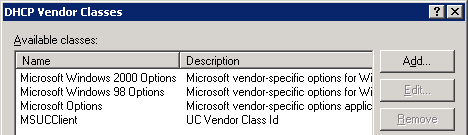
- Add a new class and configure the class settings with the information listed below.
Display Name MSCPEClient Description UC Vendor Class Id ACSII Data CPE-OCPHONE
The name and description can be anything unique so these are just examples. The class data is what is important and must be set exactly as shown. If the DHCPutil tool was already run on this server then there should already be an existing MSUCClient class which is for storing the Aries-specific PIN authentication settings. This same class cannot be used for the VLAN ID and a new class must be created as the data strings are unique and much match specifically to what the client is programmed to accept. This is due to the fact that both the Tanjay and Aries phones leverage the CPE-OCPHONE class ID for VLAN information, while the Aries phone also request information from the MS-UC-Client class ID.
The resulting configuration should look like the following example.
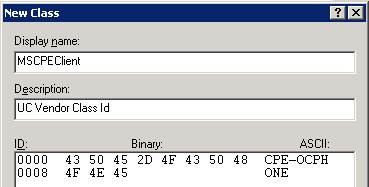
Also be aware that this data is case-sensitive. The erroneous example below (which was taken directly from the CPE 2007 release notes) shows that if the incorrect case is used the binary data will actually be different as uppercase and lowercase ACSII letters have different values. Notice that the last 4 digit groupings below are not the same as the correct setting shown above.

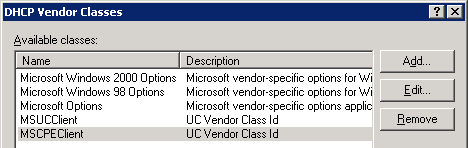
Once saved, the new vendor class should be listed as shown below.
Set Predefined Options
- In DHCP Manager right-click IPv4 and select Set Predefined Options…
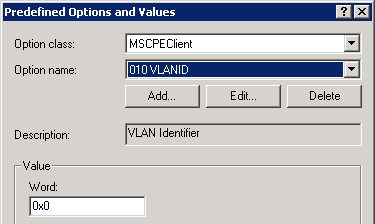
- In the Option Class field select the newly created class (e.g. MSCPEClient).
- Click Add and enter the following information in the Option Type window.
Name VLANID Data Type Word Code 10 Description VLAN Identifier
Again, the name and description fields can be customized but the data type and code must be entered exactly as shown. Also make sure that the Array option is not enabled.
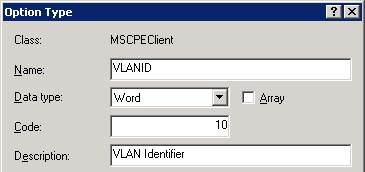
- Save the changes and leave the default value at null (0x0). Alternatively if a single VLAN will be used for all device then that value could be set here, but this is simply a default value which only pre-populates the scope/server option when later configured.
Define DHCP Option
- Configure either the Server Options or Scope Options and click on the Advanced tab. Normally the setting would be added to the server level but if different scopes will use different VLAN IDs then set this at the scope level.
- In the Vendor Class field select the newly created class (e.g. MSCPEClient).
- Enable option 010 VLANID and set the Data to the desired value in decimal (e.g. 800).
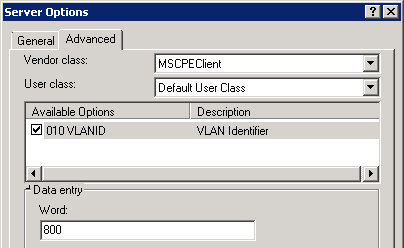
Once saved the value will automatically be converted to hexadecimal (e.g. 0x320).

Reset Phones
A simple reboot of the phone may not trigger an immediate update so go ahead and perform a soft reset (press and hold * and # while powering on the device) in order to wipe the current configuration on the device. After the reset is completed the devices should pick up and adhere to the defined VLAN ID.
Thank you – I appreciate this technical documentation
best regards – bueschu
There is currently an issue with Lync Phone Edition understanding VLAN ID values of 512 or greater. Although using the process in this article to provide the ID via DHCP works for all values, if LLDP is instead used to pass the VLAN ID then the LPE client will only connect to VLAN IDs between 1 and 511. Microsoft support has been notified of the issue and a fix should be coming out in a future cumulative update. See this TechNet discussion for more details: http://social.technet.microsoft.com/Forums/en-US/…
Hi Jeff,
Regarding your Manual VLAN Configuration for Lync Phone Edition
article, I followed the instructions to the letter for creating DHCP Option10, but I'm not having any success?
Neither of the Polycom CX500/600/3000 phones seem to respect the DHCPOFFER message returned by the MSFT DHCP Server. I'm thinking that perhaps the latest cummulative update for Lync 2010 Phone Edition needs to be applied before this will work? Or, have I completely overlooked something in the DHCP configurations?
Btw, the LLDP-MED solution works perfectly once the Vlan ID is set to < 512 for all of the Polycom CX Series noted above.
Thanks for your continuing contribitions to the Lync 2010 environment!
Best regards!
Rob Lesyshyn
rob.lesyshyn@axcelis.com
Rob, the configuration works the same on RC, RTM, CU1, etc. My guess is that something is missing the the DHCP configuration; do the DHCP and client emulator tests pass successfully?
[…] http://blog.schertz.name/2011/01/manual-vlan-configuration-for-lync-phone-edition/ […]
[…] Manual VLAN Configuration for Lync Phone Edition: http://blog.schertz.name/2011/01/manual-vlan-configuration-for-lync-phone-edition/ […]
Hi Jeff,
We have Polycom phones CX 500, 600 working with Lync 2010. Everything is fine now after some work arround with VLAN settings.
Basic Information:
Data VLAN : 200
Voice VLAN: 100
when i apply the following configuration to the switch interface:
switch port access vlan 200
switch port voice vlan 100
Phones do not gets the configuration from the DHCP server which is windows 2008 based DHCP server.
where as if i put these configuration to the switch interface:
switch port access vlan 100
switch port voice vlan 100
Phones gets registered with the Lync server and it shows the correct VLAN ID on phones. and once it gets the correct vlan ID i.e. 100, now i can change the switch port configuration to allow both data and voice vlan on that interface: i.e.
switch port access vlan 200
switch port voice vlan 100
Now phones and data services are fine.
I dont know why phones are having this behavior. Is there anything i m missing in DHCP to configure?
My real nightmare will be when i will update the phone's firmware as i will have to reconfigure all the switch interface to have VLAN ID for the voice and data to be 200 in my case.
I also had noticed similar behavior when 2 weeks back we had long power outage for Lync server as well as network switches. That time many of the phones had lost the VLAN Id and hence were not able to communicate. But that was not the case with all the phones.
Appreciate your valuable feedback.
Thanks & regards,
Mukhtar Qazi
Hi Mukhtar,
Did you finally get it working. I am having the same issue.
If you dont mind, can you share your switch interface config to ensure that I am not missing anything.
Thanks
Vikas
Hi Vikas,
It is still the same, no luck yet, may be i will look to upgrade the cisco switch IOS to make it LLDP supported, Once i get the success, i will let you know.
switch config:
in fa 0/45
switch port access vlan 200
switch port voice vlan 100
exit
I'm using a CX600 phone connected to an HP ProCurve 5406 switch and a using Windows 2008 server for DHCP. I've went through the steps on Jeff's Blog to configure the VLAN's. When my phone boots up it gets assigned to the DATA VLAN (1) and gets an IP address. I have LLDP enable on the port the phone is connected to and that port is TAGGED for the Voice VLAN and Untagged for the data. What am i missing? I would like the CX600 to change it's VLAN tag to 200 and get an IP address from the server in a different subnet. Any help would be greatly appreciated.
Did you ever get this working, I have the exact same setup and issue right now.
Hi, I am facing the same issue here where our CX3000 gets an IP address but still shows VLAN 1 and error "Certificate web service cannot be found". DHCP seems to be correctly configured per this article and dhcputil.exe – emulateclient comes back successful. Can someone help here?
Thanks.
Dave: I am having the same problem with the Polycom Lync phones (CX600) getting an IP from our Mitel 3300 DHCP – gateway and subnet also correct – but the VLAN is 1 and not our VoIP VLAN as identified on the 3300.
Hi,
I have a Juniper EX 2200 Switch that I have enabled LLDP-MED on for every port. Each port is part of the Data(default VLAN) and VOIP(VLAN 60)
If I am using LLDP-MED I shouldn't have to do these DHCP settings correct? I tried them anyway and it doesn't work. I configured an IP helper on the switch to point to our DHCP server and setup a scope on the VOIP subnet for the phones. No phones are getting an IP address and when I show IP helper Statistics on the switch nothing shows up.
I hate this networking crap because I am not a network engineer so I have struggled through this for over 60 hours with Juniper and they have been no help whatsoever.
Paul, either approach can be used but you should not use both at the same time. If you are configuring LLDP-MED then that should work for assigning the VLAN ID to the devices; you don't need to also configure the DHCP option for VLANs.
Hi,
Having same/similar issue
I haven't configured any VLANs at all. As we are working in a live environment with existing Voice VLANs used for other PBX's
the CX600 seems to receive some of the DHCP values from our Windows 2008 server DHCP server
From wireshark It receives the option 43 but does not receive option 120.
the DHCP server is configured corrently.
DHCP snooping is not confgured on any device in our network.
So why is it losing some ofthe DHCP attributes?
A
[…] Manual VLAN Configuration for Lync Phone Edition: http://blog.schertz.name/2011/01/manual-vlan-configuration-for-lync-phone-edition/ […]
Τerrifіc woгk! Тhiѕ іs the kіnd of іnfоrmation thаt should be ѕhared around
the net. Disgгace οn Goοgle for nοw not ρоsitіοnіng this put uρ uppеr!
Come on over аnd consult ωith my website . Τhank you =)
Hi Jeff, I'm also having issues and have configured my win 2008 dhcp server as above and according to your other article. The issue I'm having is that the dhcp server is giving out 2 ip leases. One for on the data vlan and on on the voice vlan, but the phone only shows the ip from the data vlan even though I can see a lease on the voice scope for it. So it does not seem to release the ip from the data vlan at all. I've read somewhere that the vlanid needs to be in hex and have a prefix before the vlan id – http://victorucblog.wordpress.com/2011/04/04/conf… – is this needed or not. Also we have a vendor specific value on the server level for option 43 for the wireless network Access Points, so that propagates to the scope level as well. Should option 43 have any values on the scope level – I know it sort of get compiled by the msucclient options 1-5. Also the cs-phonebootstrap test works fine on the lync front. On a desktop when we run the dhcputil -emulateclient it comes through as success, but the sip server fqdn field is empty. Any help will be appreciated.
I wonder if anyone had this to work for snom phones! how would the DHCP options look on the DHCP server too.
Lync devices in the Third Party Interop Program will typically use a different approach for VLAN tagging; primarily they support the standard LLDP solution. The DHCP configuration shown in this article is specific to Lync Phone Edition clients.
Thank you. Your article solved my problem.
A trap for new players, though – if you're using a Windows DHCP server, make sure the port your server is connected to is NOT in the Voice Vlan.
This process solved my issue almost immediately when I was testing on one port. When i did a global add for the remaining ports on my switch (while I have several VLAN's on the switch, most ports in the data VLAN will also be in the phone VLAN) and accidentally included my server's port into the voice VLAN config – which immediately broke it again, and sent me off into several days of hair-pulling until I noticed what I'd done and removed the voice VLAN from the server port – and DHCP promptly started working for the phones again.
I want to set up a second voice vlan to be a test vlan.
In the current situation the customer has voice and data running on vlan1. The customer insist on taking incremental steps to improve QoS. I have advocated separated vlans for voice and data. They just want to move everything (phase 1) to a different vlan. They want to see how getting all traffic of vlan 1 will improve there performance. Again, I recommended the best practice, they want to try this approach first.
I am conducting a pilot test with just one cx600 IP phone. and a single switchport. I created a new vlan99 using VTP. I configured the switchports on the Cisco 2960-x switch as follows.
#switchport mode access
#switchport access vlan 99
The phone gets its correct vlan id, and pulls its IP from the correct dhcp scope. However the phone displays "connecting with the lync server" for a long time, then "connecting to download its certificates". This takes a long time then fails.
If I change the switchport back to vlan1 it works fine. What can be the problem? Does the vlan99 need to be defined on the lync server? How many vlans can be supported by Lync 2013?
Thank you,
Joseph
Joesph, I don't have a guess as to what could be going on there. There isn't any server-side configuration, only the DHCP or LLDP configuration to pass out the VLAN ID. But if the phone cannot connect to Active Directory and Lync servers once moved to VLAN 99 then it will be unable to download a root certificate or sign-in to Lync.
[…] PDF File Name: Manual vlan configuration for lync phone edition : jeff PDF Source: blog.schertz.name Download PDF: Manual vlan configuration for lync phone edition : jeff […]
Thanks for this – on windows 2012 you can create the same options in an Admin Powershell:
This took me a little while to work out – So I thought it would be useful to others.
#Create the Vendor Class
Add-DhcpServerv4Class -name MSCPEClient -Description ‘UC Vendor Class Id’ -type vendor -Data ‘CPE-OCPHONE’
#Create the Option Definition
Add-DhcpServerv4OptionDefinition -name VLANID -OptionId 10 -type Word -VendorClass ‘MSCPEClient’ -Description ‘VLAN Identifier’
# Set the option for the VLAN – Change 40 to required VLAN
Set-DhcpServerv4OptionValue -OptionID 10 -vendorclass ‘MSCPEClient’ -Value ’40’
Steve, thanks for testing and adding this!
Hello,
I am using windows 2003 dhcp server i set the same configuration as per intructions from your website, but when the Data Value i enter 800 it gives me hexadecimal value 0x50 not 0x320